
















In Parts 1-3, we covered the ecosystem, Cowork, and Skills.
By now, you’ve got the working environment. You’ve got Skills that encode your methodology. This edition covers the marketplace around all of that – where you find more of everything: connectors, plugins, and community-built skills.
Three things to understand:
- Connectors bring your data in.
- Plugins give Claude capabilities.
- Skills give Claude your methodology.
Stack all three, and Claude stops operating in isolation and starts working inside your actual environment, with your actual tools, following your standards.
Let’s break each one down.
Connectors: bringing your data in
Connectors plug Claude directly into the tools where your work already lives.
Slack, Gmail, Google Drive, HubSpot, Notion, Granola, Amplitude, Figma, Gamma, Linear, Jira – over 50 integrations and growing.
You authenticate once.
After that, Claude can pull data from those tools in any session – Chat, Cowork, or Code. No copy-pasting. No exporting CSVs. No switching between tabs to manually feed Claude information; it could have pulled itself.
Free on all plans. No additional cost beyond your existing subscription.
How to set them up:
Go to Settings --> Connectors in Claude.
Browse the directory. Click the one you want, authenticate, done.
Each connector has a page showing what it can read, what it can write, and which plans it’s available on.
The connectors that matter for PMM work – and what you’d actually use them for:
📌 Slack
This is the big one. Claude can search your workspace channels, messages, and files. Two-way – it can send messages and create canvases too.
PMM use case: You’re preparing a quarterly competitive update.
Instead of manually scrolling through #sales-feedback, #competitive-intel, and #customer-success for the last 90 days, you ask Claude to pull every mention of your top three competitors across those channels, extract the patterns, and produce a competitive trends summary.
What used to take half a day of Slack archaeology becomes a single prompt.
📌 HubSpot (or your CRM)
Pull deal stages, contact properties, pipeline data, and closed-lost reasons directly into your analysis.
PMM use case: You’re running a win/loss analysis and need to identify which competitor shows up most often in lost deals, which personas are involved in those deals, and at what stage they drop off.
Claude reads from your actual pipeline data instead of a spreadsheet export that’s three weeks stale. The analysis reflects what’s happening now, not what happened when someone last remembered to pull the data.
📌 Google Drive
Claude can search your documents, spreadsheets, and presentations across shared drives.
PMM use case: You’re updating your messaging framework and need to cross-reference the latest product brief, last quarter’s positioning doc, and the competitive analysis your colleague put together two months ago.
Instead of hunting through shared folders and uploading files into Claude manually, Claude searches Drive, finds them, and works from the source documents directly.
📌 Notion
Access your team’s briefs, strategy docs, meeting notes, and wikis.
PMM use case: Your launch brief lives in Notion.
So do the product specs, the customer research notes, and the stakeholder feedback from the last positioning review.
With Notion connected, Claude can reference all of this when you run a GTM Skill – pulling real context from your actual working documents instead of a context file you had to create and keep updated separately.
📌 Granola
AI-powered meeting notes that capture what was said and what was decided. Granola runs in the background during your calls and produces structured summaries automatically.
PMM use case: You ran five customer interviews this week for a positioning refresh.
Instead of rewatching recordings or cleaning up your notes manually, Claude pulls your Granola transcripts, extracts the recurring themes, maps them against your existing messaging framework, and flags where customers used language that matches – or contradicts – your current positioning.
Five hours of interviews synthesized into a structured brief without you opening a single transcript.
📌 Gamma
AI-powered presentations and documents. Create polished decks and one-pagers directly from Claude.
PMM use case: You’ve just finished a positioning workshop and need to turn the output into a stakeholder deck before end of day.
Claude takes your messaging framework, pulls it into Gamma, and produces a presentation-ready deck – structured, formatted, and on-brand. No blank slides, no layout fiddling. Workshop to deck in one prompt.
📌 Amplitude
Product analytics and user behavior data. Usage patterns, feature adoption metrics, engagement data.
PMM use case: You’re building the case for why a specific feature needs better positioning and more enablement investment.
Claude pulls the actual adoption data from Amplitude – who’s using it, what segment they’re in, where they drop off – and layers that on top of your qualitative customer research. The business case writes itself when the data is real.
📌 Gmail
Read and draft emails. Useful for stakeholder communication, but also for pulling conversation threads into research synthesis.
PMM use case: You’ve been collecting customer feedback via email from your CS team for weeks. Instead of copying and pasting quotes into a doc, Claude reads the threads directly and synthesizes them into a structured voice-of-customer report – with themes, verbatim quotes, and frequency analysis.
📌 Figma
Access design files and brand assets.
PMM use case: You’re reviewing launch creative and need to check whether the landing page hero copy matches your approved messaging framework.
Claude pulls the Figma file, reads the copy, cross-references it against your positioning doc, and flags any inconsistencies – without you opening Figma at all.
There are dozens more – Asana, Linear, Monday.com, Canva, Jira, Stripe, WordPress.
Browse the full directory at claude.com/connectors and connect what’s relevant to your workflow. You can always add more later.
Custom connectors: If your company uses a tool that’s not in the directory, paid plan users can add custom connectors by entering a name and MCP server URL in Settings --> Connectors --> “Add custom connector.” This requires your tool to support the MCP protocol - your engineering team can help set this up.
Plugins: capability bundles
If connectors are the data pipes, plugins are the capability packages.
A plugin bundles together skills, slash commands, and sometimes sub-agents into a single installable package designed for a specific type of work.
A connector gives Claude access to Slack. A plugin gives Claude the ability to do marketing work – and knows how to use Slack as part of that workflow.
Here’s what you might not realize: Cowork ships with 11 plugins already installed.
Go to Settings --> Plugins and take a look.
Anthropic built a set of knowledge-work-plugins covering marketing, sales, product management, productivity, finance, legal, data, and more. They’re pretty awesome.
If you’ve been using Cowork since Part 2, these have been sitting in your environment the entire time.
The Marketing plugin
IMO this is the one to explore first.
It gives you seven slash commands – type /draft-content to draft a blog post, /campaign-plan to generate a full campaign brief, /brand-review to check any content against your brand voice.
There’s also /competitive-brief, /performance-report, /seo-audit, and /email-sequence.
Behind those commands are five built-in skills covering content creation, campaign planning, brand voice enforcement, competitive analysis, and performance analytics.
Once it’s installed, customize it. Go to Settings --> Plugins, select Marketing, and hit Customize. Claude opens a chat and walks you through setup - your company, your tools, your brand voice, your tone.
Takes about five minutes. Once that’s done, every /draft-content and /brand-review command applies your standards automatically. The difference between Claude guessing at your tone and Claude enforcing it.
Other plugins worth exploring
All of these ship with Cowork by default:
📌 Sales: Call prep, pipeline review, outreach drafting, competitive battlecards. If you work with sales on enablement, the overlap with your PMM work is significant.
📌 Product Management: Specs, roadmaps, research synthesis, stakeholder updates. Connects to Linear, Jira, Figma, and Amplitude. The PMM-PM crossover makes this one immediately useful.
📌 Enterprise Search: Searches across email, chat, docs, and wikis simultaneously. Useful when you need Claude to find information scattered across five different tools.
📌 Productivity: Task management, calendar, daily workflows. Connects to Slack, Notion, Asana, and most project management tools.
You can browse all 11 at github.com/anthropics/knowledge-work-plugins.
And you can add plugins from other marketplaces too – the format is cross-compatible, so Code’s developer plugins work in Cowork and vice versa. The full plugin directory is at claude.com/plugins.
Where things live – a quick reference
Once you start using Skills, Plugins, and Connectors across different surfaces, you’ll want to know what works where:
📌 Connectors work everywhere. Connect once, available in Chat, Cowork, and Code.
📌 Skills uploaded via Claude Desktop Settings (your .zip or .md files) work in Chat, Cowork, and Code Tab. Shared across all surfaces. This is where your PMM Skills Pack lives.
📌 Plugins are surface-specific. Cowork and Code Tab each have their own plugin panel – installing in one doesn’t make it available in the other. Cowork ships with business plugins (marketing, sales, product management). Code ships with developer plugins (code review, frontend design).
📌 Built-in skills (pdf, docx, pptx) work in Chat, Cowork, and Code Tab out of the box.
Skills: individual playbooks
You already know Skills from part 3. This section is about where to find more of them beyond what you build yourself.
Community skills repos
- github.com/alirezarezvani/claude-skills – 192+ skills covering marketing, product, engineering, and operations. Browse for structure and inspiration, then customize for your workflow.
- github.com/anthropics/skills – Anthropic’s official skills collection.
- skillsmp.com – A marketplace for agent skills across Claude, with search and categories.
The PMM Skills Pack (the one we released in the bonus edition)
- github.com/pmalliance/product-marketing-skills – Six skills covering context, messaging, competitive intelligence, customer research, go-to-market, and pricing.
A reminder on community skills: Someone else’s skill is someone else’s workflow. The repos are useful for seeing how other people structure their instructions – what they include, what they leave out, how they handle negative constraints. But the real value is in encoding YOUR process, YOUR quality bar, YOUR context.
A competitive analysis skill built for a PLG SaaS company looks very different from one built for an enterprise security vendor. The methodology might overlap. The context never does.
Use community skills as starting points and reference material. Then make them yours.
How they stack together: the PMM toolkit
Here’s what a fully configured PMM setup looks like when you combine all three layers:
- Layer 1: Connectors (your data) Slack, HubSpot, Google Drive, Amplitude, Notion – connected once, available in every session.
- Layer 2: Plugins (your capabilities) Marketing plugin customized with your brand voice and tools. Sales plugin for enablement work. Product Management plugin for cross-functional collaboration.
- Layer 3: Skills (your methodology) PMM Skills Pack installed and customized for your product and market. Custom skills built from your best conversations – your positioning framework, your launch process, your competitive analysis methodology.
When Claude runs a task, it pulls from all three layers. Your competitive intelligence skill tells Claude how to structure a battle card. The marketing plugin’s brand voice feature ensures it matches your tone.
The Slack connector lets Claude pull the latest sales objections. The HubSpot connector gives it real deal data. The Google Drive connector lets it reference your latest positioning doc.
That’s a system. One prompt. Multiple data sources. Your methodology. Your voice. Real output.
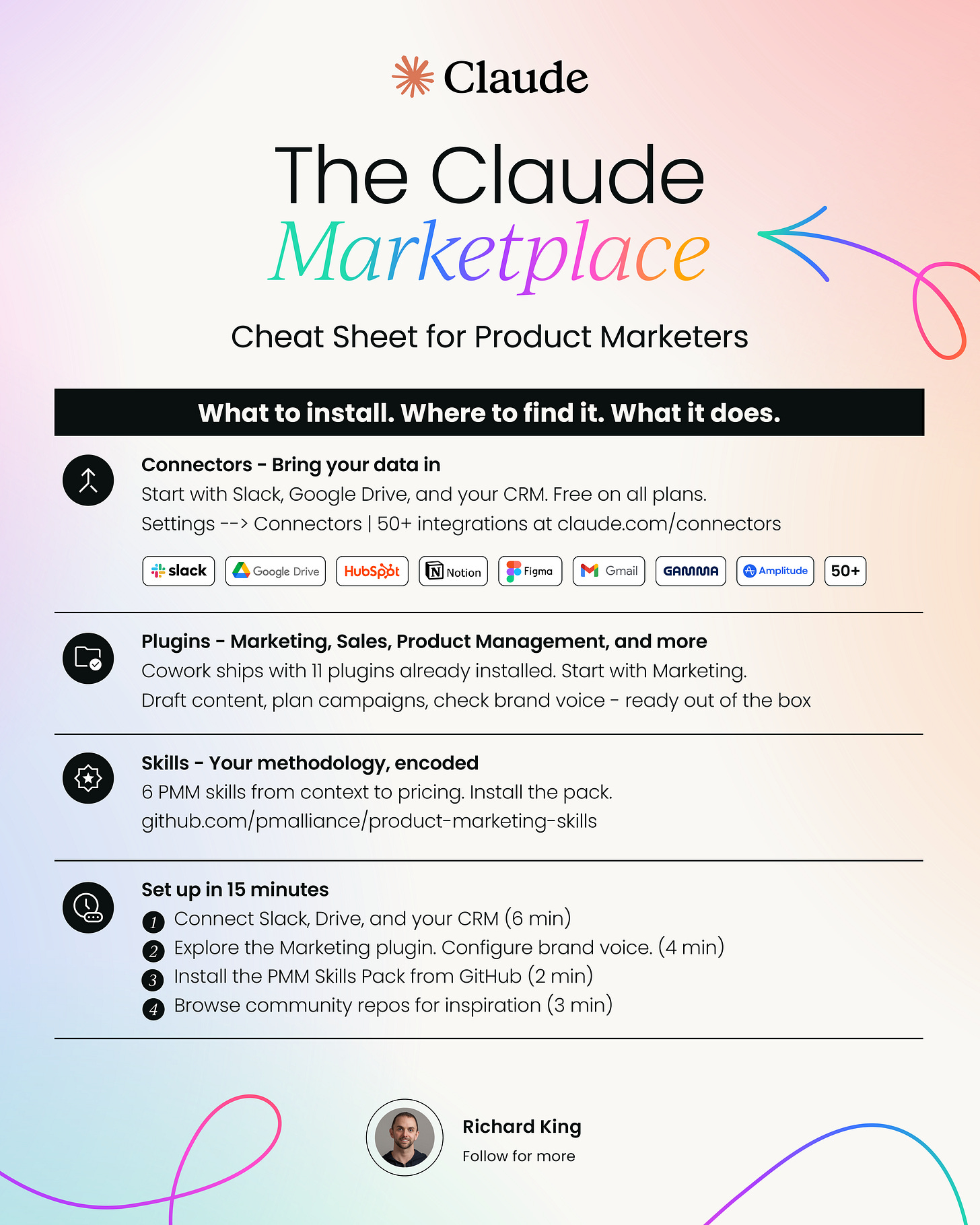
Building your own: the 15-minute PMM toolkit setup
If you’ve been following the series, you’re probably halfway there already. Here’s what a complete setup looks like, and what you might be missing:
Already done (from Parts 2 and 3):
- Cowork installed with your working folder and context files
- PMM Skills Pack installed and customized
Add now (15 minutes):
- Connect your core tools. Settings --> Connectors. At minimum: Slack, Google Drive, and your CRM (HubSpot, Salesforce, etc.). Authenticate each one. Takes about 2 minutes per connector.
- Install and customize the marketing plugin. Settings --> Plugins. Find Marketing, install it, then hit Customize. Claude walks you through a setup conversation: your tools, your brand voice, your tone.
- Install one more plugin that matches your workflow. If you work closely with sales, install the sales plugin. If you’re embedded with product, install the product management plugin. Don’t install everything – each plugin adds capabilities Claude needs to process, so keep it focused.
- Browse the community skills repos. Spend 10 minutes in the repos linked above. Look for skills that match workflows you do regularly. Download anything interesting, read how it’s structured, and use it as a template for building your own.
That’s it. You now have a Claude environment that knows your voice, your methodology, your competitive landscape, and can pull live data from your actual work tools.
A few things to be intentional about
Security still matters
Every connector you add expands what Claude can access. Every plugin expands what Claude can do. Stick to verified connectors from the official directory and plugins from the Anthropic marketplace or knowledge-work-plugins repo. Review permissions before installing anything from a community source.
Don’t install everything
It’s tempting to connect every tool and install every plugin. Resist that. Each connector and plugin adds context Claude needs to process. Focus on the tools you actually use in your PMM workflow. Three well-configured connectors beat twelve unused ones.
Plugins and skills can overlap
The marketing plugin includes a competitive analysis skill. Your PMM Skills Pack includes a competitive intelligence skill. They approach the same workflow differently.
That’s fine – Claude will use the one that best matches your prompt. But if you’re getting inconsistent output, check whether two skills are competing for the same task and disable the one that fits less well.
Custom connectors are powerful but technical
If your company has internal tools with APIs, a custom MCP connector can bring that data into Claude. But setting one up requires engineering support. Flag it for your team as a future project if there’s a tool Claude should be able to access but can’t.
The bottom line
The marketplace is where Claude stops being a standalone tool and starts operating inside your actual work environment. Connectors bring your data in. Plugins give Claude professional capabilities. Skills encode your methodology.
You can use any one of these layers on its own. But the compound effect - the thing that makes the output genuinely useful rather than just impressive - comes from stacking them.
The full series: Mastering Claude as a product marketer
Part 1: Mastering Claude for product marketing – What everything actually is. The map.
Part 2: Claude Cowork for product marketing – How to set it up, the PMM workflows that benefit most, and how to go from “chat responses” to “finished deliverables in your folder.”
Part 3: The complete product marketing Claude skills pack – Everything you need to master Claude skills for product marketing
Part 5: Claude Code for product marketing – When and why you’d go here. And why the jump from Cowork is smaller than you think.
Part 6: Bringing it all together – Claude for product marketing – How Chat, Cowork, Code, Skills, and Connectors work as one system. The full PMM Claude setup, from first install to daily workflow.


Product marketing insider
Thank you for subscribing
Level up your product marketing career & network with product marketing experts.
An email has been successfully sent to confirm your subscription.
 Follow us on LinkedIn
![The Claude Marketplace for product marketing [Series 4 of 6]](https://storage.ghost.io/c/e8/42/e8425f10-c6bc-4266-b03f-495034377a60/content/images/size/w600/2026/04/The-Claude-Marketplace-for-product-marketing-1.png)


.svg)
Start the conversation
Become a member of Product Marketing Alliance to start commenting.
Sign up now